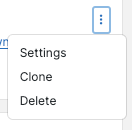
To modify an existing Dashlet on your Dashboard, click the kebab menu.
Settings
On the Settings screen, you can change the name and any of the selections for the dashlet.
Clone
The Clone menu item lets you make a new copy of the dashlet, which can be edited without affecting the original dashlet.
Delete
Delete will remove the dashlet altogether. There is no undo, and if you remove a dashlet on a shared dashboard, it is removed for all users.